





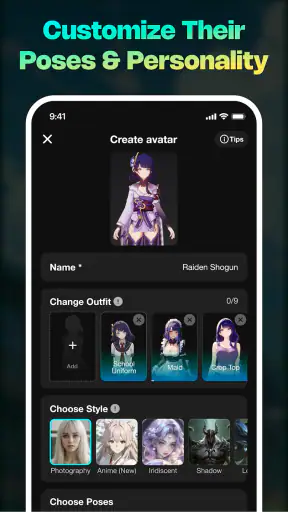
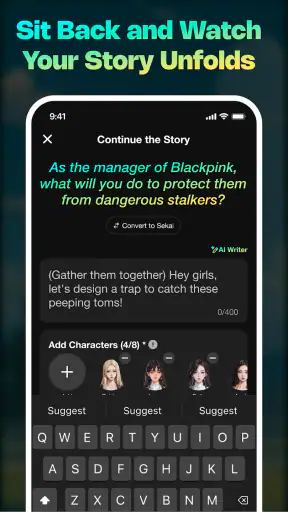



I went into Sekai: Create · Remix · Play expecting a quick entertainment app, but its real appeal is closer to a small creative playground. It lets me build interactive AI games, quizzes, and mini apps without writing code, then try the results immediately. That combination makes it more interesting than a passive feed, although it also means the quality of the experience depends heavily on how clearly I describe what I want.
Sekai is an entertainment app from Sekai, available free of charge for users on Android 10 or later. It carries a Teen content rating, and the current version is 2.2.2. Those details matter because this is not simply a collection of finished games; it is a tool for making lightweight interactive experiences, including ones that may be shared or played by other people.
In my experience, the best way to understand it is to stop treating it like a traditional game catalog. I use it more like a conversation-driven workshop: I start with an idea, shape the result, test it, and then decide whether it is worth refining. That process can be surprisingly satisfying when the concept is small and specific.
How Sekai feels in everyday use
The first useful distinction is between creating something and playing something. If I only want polished entertainment with established rules, a conventional mobile game is usually a better fit. Sekai becomes appealing when I want to turn an idea into something interactive without opening a game engine, learning a scripting language, or assembling a complicated project.
A realistic example would be a family gathering where I want a quick quiz about shared memories. Instead of preparing slides and manually keeping score, I could describe the theme, the tone, the number of questions, and the kind of interaction I want. The resulting mini app may give me a starting point that I can test with the group. It is particularly useful for informal moments like this, where speed and novelty matter more than professional presentation.
I also see a place for it in study breaks. A learner could turn vocabulary, historical facts, or revision prompts into a simple quiz, then use the interactive format to make repetition less dull. I would still check every answer myself, because AI-generated material can misunderstand a prompt or produce content that sounds plausible without being reliable. Sekai can help shape practice, but I would not use it as the final authority for school, medical, legal, or other high-stakes information.
The same flexibility creates the app’s main weakness. A vague request tends to produce a vague result. “Make me a fun game” leaves too many decisions open: What is the objective? How long should a round last? What counts as success? Who is it for? I get much better results when I describe the player, the mood, the rules, the desired length, and what should happen after a correct or incorrect choice.
Prompting is part of the design process
My most useful habit is to treat the first generated version as a prototype, not a finished product. I start with one central mechanic and then ask for focused changes. For example, I might first request a short quiz, then adjust the difficulty, replace unclear questions, simplify the wording, and improve the ending. This is more manageable than asking for a huge project with many systems at once.
That workflow reveals an important trade-off: Sekai reduces the technical barrier, but it does not remove the need for creative decisions. I still have to judge whether the instructions are fair, whether the pacing is enjoyable, and whether the result makes sense to another person. The app handles much of the construction, while I remain responsible for the idea and the quality check.
A second practical tip is to define the audience before describing the content. A quiz for children, a party game for adults, and a solo challenge for a puzzle fan should not use the same language or difficulty. Adding that context early gives the AI a clearer target and reduces the amount of correction I need later.
I also recommend testing the experience as a player rather than as its creator. When I already know the intended answer, confusing wording is easy to overlook. Playing from the beginning without relying on my own explanation exposes unclear instructions, repetitive questions, and moments where the interaction does not communicate what to do next.
Where the remix idea becomes useful
The remix side is more valuable than it may first appear. Starting with an existing concept and changing its theme, tone, or challenge can be faster than creating everything from a blank request. I can take a basic format and move it toward a trivia night, a light role-playing scenario, a decision-based story, or a simple practice activity.
This is especially helpful when I know the kind of interaction I want but cannot describe a complete design. A familiar structure gives me something concrete to react to. I can say that a result is too long, too easy, too serious, or not social enough, then guide it in a better direction. In that sense, remixing is not merely copying; it is a way to discover what I actually want through small changes.
There is a creative limitation, though. A remix can inherit the weaknesses of its starting point. If the original concept has repetitive choices or unclear progression, changing the subject may not solve the underlying problem. I get the strongest results when I preserve the basic idea but rebuild the parts that affect pacing and clarity.
What the current version means for users
The current version, 2.2.2, gives prospective users a clear reason to try the app now: it is mature enough to have a substantial audience while still being centered on quick creation and experimentation. Sekai has an average rating of 4.6 from around forty-four thousand ratings, with more than two thousand written reviews. Those figures suggest that the concept is reaching people beyond a tiny group of early experimenters, although popularity alone cannot guarantee that every generated experience will suit my taste.
It has passed five million installs, which also changes how I view it. I am not approaching an obscure experiment with no established user interest; I am using a recognized entertainment product with a sizable audience. At the same time, a large audience can bring a wide range of expectations. Someone looking for polished, conventional gameplay may judge it very differently from someone who enjoys making unusual prototypes.
For existing users, version 2.2.2 is the practical reference point. I would evaluate any update by asking whether creation feels more predictable, whether revisions are easier to make, and whether playing the result feels smoother than before. Those are the changes that matter most in an app like this. A new visual detail is less important to me than being able to turn a rough idea into a usable mini app without fighting the workflow.
I would also keep personal projects small when testing a newer version. A short quiz or compact decision game makes it easier to notice whether the creation process has improved. Large projects can hide problems because there are too many variables. A controlled experiment gives a better sense of whether an update genuinely helps or simply changes the surface.
Who will enjoy it most
Sekai is a strong match for curious people who like making things but do not want to learn traditional development tools first. It suits students building playful revision exercises, friends preparing a custom party activity, writers exploring interactive choices, and hobbyists who enjoy testing ideas quickly. It can also work for someone who wants to share a small creation without committing weeks to a full project.
I think it is particularly good for people who enjoy iteration. If the pleasure comes from trying an idea, spotting what feels wrong, and improving it, the app offers a rewarding loop. The first result does not need to be perfect because the process itself is part of the entertainment.
It is less suitable for a developer who needs precise control over code, data structures, performance, or complex rules. A no-code AI approach is convenient, but convenience comes with less direct control. If a project requires exact behavior, advanced customization, dependable persistence, or a carefully tuned competitive system, a dedicated development environment remains the better choice.
I would also skip it if I only want a finished game to play for a long session. Sekai’s novelty comes from creation and remixing, not from replacing a large library of professionally designed titles. It can produce something enjoyable, but I would not compare a quick generated mini app directly with a fully developed console-style experience.
Limitations I noticed while judging the concept
The biggest friction is consistency. AI can interpret the same kind of request differently depending on the wording and the amount of detail. That makes discovery exciting, but it can also make the result feel unpredictable. I need patience when the first attempt misses the tone or mechanic I had in mind.
Another limitation is quality control. A generated quiz may contain an awkward question, an answer that needs checking, or a difficulty curve that rises and falls without intention. A generated story may offer choices that feel too similar. These are not reasons to dismiss the app; they are reminders that the creator still has to review the output carefully.
There is also a difference between technical simplicity and design simplicity. Sekai may make it easier to produce an interactive format, but a good experience still needs a clear goal, useful feedback, and a satisfying ending. If I ignore those fundamentals, the result can feel like a demonstration rather than something I would willingly play twice.
The Teen rating is another reason I would think about the audience before sharing a creation. I would not assume that every generated result is appropriate for younger children simply because the format looks playful. For family use, I would preview the content, wording, and themes myself before handing it to children.
How it compares with ordinary alternatives
Compared with a standard quiz app, Sekai offers more freedom but less certainty. A conventional quiz platform usually gives me fixed templates, established question handling, and a predictable presentation. Sekai gives me the chance to invent a stranger theme or combine several ideas, but I have to inspect the result and refine it.
Compared with a visual coding tool, Sekai is quicker for a first experiment. I do not need to learn blocks, variables, event logic, or interface construction before seeing something happen. The trade-off is that I lose the detailed control those tools provide. For a classroom introduction or a playful prototype, Sekai may be more approachable; for a serious project, a coding or game-development tool is likely to scale better.
Compared with a chatbot that only returns text, Sekai is more engaging when I want choices, questions, or a small interactive loop. The result feels closer to an activity than an answer. Still, if my goal is brainstorming, explanation, or writing assistance rather than interaction, a general conversational tool may be faster and more focused.
That comparison helped me place Sekai correctly. It is not trying to be the most powerful development environment or the deepest entertainment library. Its value is in the middle ground: turning an idea into something playable with less setup than traditional creation tools.
Questions I would answer before installing
If you are wondering whether you need coding experience, I would say no for the kind of projects the app is designed to encourage. The important skill is explaining the desired experience clearly and recognizing when the result needs correction. Someone who has never programmed can still make a useful quiz or mini game, while an experienced creator may use it for rapid concept testing.
If you are asking whether the app is genuinely free, Sekai is listed as free, so there is no purchase price standing between a curious user and the initial experiment. I would still approach any AI creation app with normal care around the content I enter and the projects I choose to share, especially when a creation includes personal or sensitive material.
If you want to know whether generated projects are automatically polished, my honest answer is no. I would plan on reviewing every important detail. The app can shorten the distance from idea to prototype, but it cannot replace taste, fact-checking, playtesting, or a clear understanding of the intended audience.
If you are deciding between making something alone and sharing it with friends, both approaches make sense. Solo creation is better for learning the workflow and correcting mistakes privately. Sharing becomes more rewarding after I have tested the instructions and confirmed that another person can understand the experience without my help.
Finally, if you are concerned about whether the app is appropriate for a particular age group, remember that it is rated Teen. I would use that rating as a prompt to supervise younger users and inspect generated material rather than treating every creation as automatically suitable for children.
What I would watch as Sekai develops
For future updates, I would pay attention to whether the app makes refinement more precise. The most meaningful improvement would be a smoother path from “this is close” to “this behaves exactly as intended.” Better control over individual questions, choices, tone, and pacing would help creators spend less time rewriting broad instructions.
I would also watch how well the experience supports returning to older creations. An idea often improves over several sessions, so a dependable editing workflow matters more than a single impressive first result. The ability to understand what changed and why would make experimentation less frustrating.
Another area worth watching is the balance between surprise and reliability. Unexpected results are part of the fun, but users need enough consistency to build something they can confidently show other people. Sekai is most compelling when it preserves creative freedom without making every revision feel like starting over.
My final view is positive, with a clear qualification. Sekai is not a replacement for a full game engine, a carefully edited quiz platform, or a library of finished games. It is a quick, approachable way to turn ideas into interactive experiments, and I find that role genuinely enjoyable. If you like creating, remixing, and testing small concepts, I think it is worth trying. If you want complete control or guaranteed polish, choose a more specialized tool instead.
For me, the app succeeds because it makes the first step feel easy while leaving room for personal judgment. The best creations do not come from accepting the first output; they come from giving a focused brief, testing like a real player, checking the details, and refining with purpose. That is the habit that turns Sekai from a novelty into a useful part of my entertainment and creative routine.


